The calorie tracker you just talk to
Raise your wrist and say “200 g salmon and my usual rice.” YumLog logs the calories, protein, carbs and fat, and tells you what it assumed. For Apple Watch and iPhone.
Made for people who’d rather eat than type
Most calorie counters make you search a database for every bite. YumLog listens instead. Say it, type it or snap a photo, the way you’d tell a friend, and it works out the portion, the numbers and the meal. Then it says what it assumed, so a wrong guess is one sentence away from right.
Log from your wrist in one breath
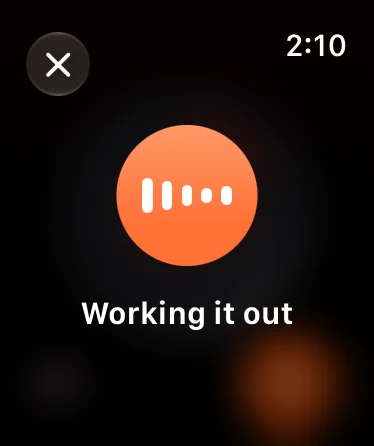
Tap the mic on your Apple Watch and say “two eggs and toast with butter.” YumLog stops listening when you do, logs it to breakfast and tells you what it assumed. Put it on a complication or the Action button and it opens already listening.
Ask before you order
Wondering what the drive-through will cost you? Ask. YumLog looks up the chain’s own nutrition numbers and answers without logging a thing. If you go for it, say “do that.”
It remembers how you eat
Save “my usual rice” or a whole recipe once, and from then on its name is enough. Got the portion wrong? Say “make that 150 g”, “that was lunch” or just “undo”, and the right entry changes.
Your day, served on a plate
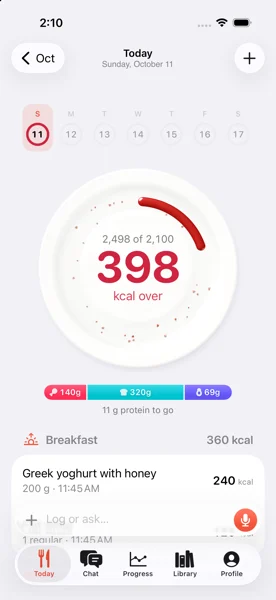
Today is a plate with a ring that gets eaten as the day goes on. Protein, carbs and fat sit underneath, and the week runs along the top. Go past your goal and the ring turns berry, so you know without reading a number.

Apple Health, both ways
Every meal goes to Apple Health with its calories, protein, carbs and fat, whether you logged it on your phone, your watch or with Siri. Weigh-ins go both ways: say “I weigh 82.1”, or step on a scale that writes to Health, and YumLog picks it up.

Wherever you are, it’s a sentence away
Say “Log food in YumLog” to Siri, see what’s left on a watch face or in the Smart Stack, and put a voice log on the Action button. Your watch, phone and Siri share one conversation, so “do that” works on whichever you pick up next.
Three steps, then just talk
-
01
Set your goal
Connect Apple Health and your height, weight and age fill themselves in. YumLog suggests a daily calorie goal you can nudge.
-
02
Say what you ate
On your wrist, on your phone or to Siri. It logs straight away and tells you what it assumed.
-
03
Ask how you’re doing
“Where am I on progress?” gets you what’s left today, the protein to go and where your weight is heading.
Questions, answered
How much does YumLog cost?
Everything is free for 7 days. After that, YumLog is a monthly or yearly subscription, and you can cancel any time from your Apple account.
Do I need an Apple Watch?
No. The iPhone app does everything on its own: talk, type or snap a photo. The watch is just the quickest way to log.
How does it know the calories?
From nutrition labels, standard food tables and restaurant chains’ own published nutrition, which it looks up on the web. It always says what it assumed, like “medium portion” or “cooked weight,” so you can correct it in a sentence.
What if it gets something wrong?
Say so: “make that 150 g”, “that was lunch, not dinner” or “undo”. You can also tap any entry to change it.
Can I log with a photo?
Yes. Snap your plate or a nutrition label in the iPhone app and add a few words if they help, like “I ate half.”
What happens to my data and photos?
Your log belongs to your Sign in with Apple account and stays in step across your phone, watch and Siri. Photos you send are deleted after 30 days. Delete your account in Settings and everything goes with it.
Where can I get it?
YumLog is coming to the App Store in the US, Canada, the UK, Australia and New Zealand first. It needs iOS 26, and watchOS 26 for the watch app.

Eat first. Log it in a sentence.
YumLog is coming soon to the App Store for iPhone and Apple Watch.
Coming soon to the App Store